Apiton - React Next App Landing Page Template
Thank you for purchasing our template. If you have any questions that are beyond the scope of this help file, please feel free to open a new support request
IMPORTANT: It's built with React JS and It's not a regular HTML Template.
Getting Started
Installation
- Node.js and NPM : You can download Node.js from https://nodejs.org. NPM comes bundled with Node.js.
Install Npm Packages
-
First unzip
Apiton-v1.0.zipyou will find two folders includingApiton(this is your root folder). Open this folder with VS Code (or any other you like). And follow step below. -
NPM : You must have to run
npm installpackages. You can do this by running npm install from the root of your project to install all the necessary dependencies.
Development server
-
Run
yarn devornpm run devfor a dev server. Navigate to http://localhost:3000 . The app will automatically reload if you change any of the source files.
Build for production and launch server
-
Run
npm run buildand thennpm run start
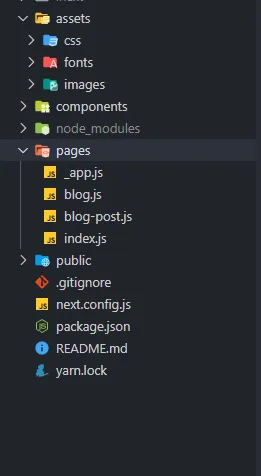
Folder Structure
Folder Structure
Layout
Default Layout
Apiton/components/Layout.js

Home
Apiton/pages/index.js

Customization
How to change Logo ?
Open Apiton/components/Header.js

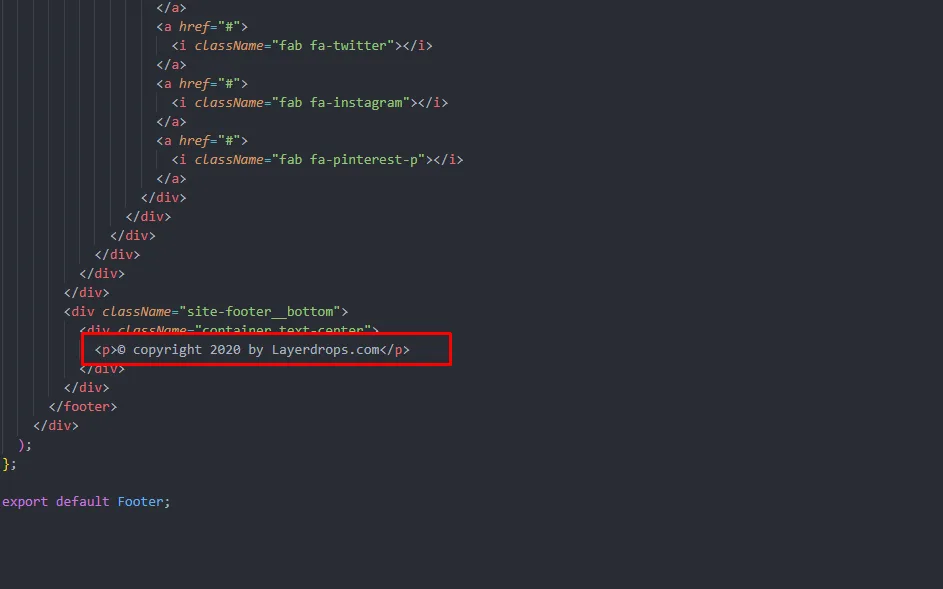
How to change Copyright ?
Open Apiton/components/Footer.js